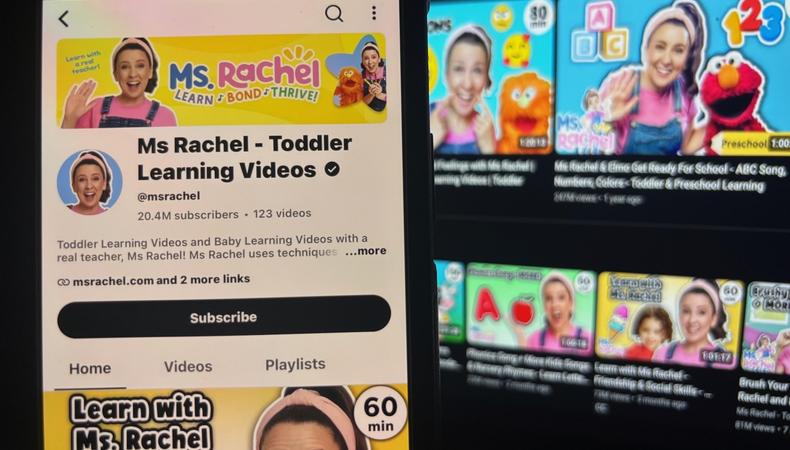
When you’re putting together your YouTube channel, YouTube banner ideas probably rank low among your priorities – if they make the cut at all. Fair enough. Nobody ever went viral on YouTube simply by virtue of having a kick-ass banner, but the best YouTube banners can still play a small but powerful role in your channel’s success. In contrast, having no banner at all may hold your channel back.
Usually the first thing visitors see, a YouTube banner is the large image stretched across the top of a YouTube account’s homepage.
The top names on YouTube all have one.
MrBeast

DanTDM

Amelia Dimoldenberg

JUMP TO
Head to Nike’s official YouTube Channel and you’ll find this image at the very top:

Banners can look a little different depending on the device you’re using (more on that below). You can upload your own image, create something from scratch, or customise a preexisting template using Canva, Snappa, or Adobe Express.
For most users, it doesn’t. If you’re only watching, commenting, and maybe uploading a few videos just for friends and family, there’s no need for a YouTube channel banner.
Dedicated creators, however, almost always have a banner. If you’re trying to become a YouTube influencer or you simply require the skills necessary for paid content creation work, here’s what banners help achieve.
1. A strong first impression
Large and prominently positioned, your YouTube banner is probably the first thing visitors to your channel’s homepage will see.
A high-quality banner can:
- Convince visitors to scroll down and click on your videos, explore your channel, and subscribe
- Make your channel appear professional and trustworthy rather than amateurish or unfinished
- Immediately grab people’s attention
Some of the best YouTube banners are relatively simple, yet they still immensely increase their channel’s visual appeal. Case in point, Bright Side:

2. A sense of your channel
“Your banner image is a larger [than your profile picture] space for you to show what your channel is about,” according to the YouTube Help pages.
Visitors should be able to look at your banner and tell what kind of content your channel offers and what your vibe is as a creator.
It’s immediately clear, for example, that both of these channels revolve around travel in different ways. Lexie Limitless is clearly into extreme travel.

Joel and Emilia are more into remote beauty.

Either way, it’s hard to be confused about what you’re getting.
3. A familiar brand identity
Forging a visual connection between your YouTube channel banner and the rest of your videos helps give your content a recognisable brand identity.
Colours, font, and overall style can all be matched. Interviewer Chris Van Vliet’s banner, for example, uses the same signature blue colour, bold white text, and image of his own face seen in the thumbnails of his YouTubes videos and across his X account.

Banners have different dimensions on different devices: mobile, desktop, and TV. It’s no good looking great on Google Chrome but rubbish on your iPhone, so here’s how to optimise.
1. Go for high resolution
Follow YouTube’s recommendation of at least 2560 x 1440 pixels to stay clear and crisp even on a 65-inch TV. “A pixelated or blurry banner doesn’t exactly signal that there’s a high-quality video to follow,” writes HubSpot’s Basha Coleman.
2. Keep a central “safe zone”
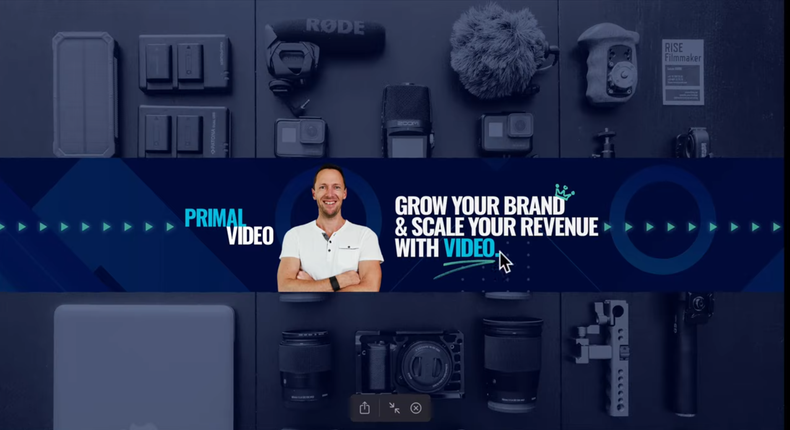
Banners are cropped depending on the device used to view your channel. All relevant info should go in that central 1546 x 423 “safe zone” to ensure that it’s displayed across all devices. The remaining space can be used to reinforce your brand.
- TVs: Display the full 2560 x 1440 pixel image.
- Desktops: Crop to a thinner 2560 x 423 pixel image.
- Mobile: Crop to a central 1546 x 423 pixel image.
Primal Video’s Justin Brown shows how Snappa visualises each zone.
3. Choose the best file type
JPG, PNG, GIF, and BMP image files up to 6MB are all supported. VidIQ’s Lydia Sweatt recommends:
-
PNGs for crisp text
-
JPGs for photo-heavy designs
4. Consider updating regularly
“It is likely that viewers are regularly coming to your page to find your latest video upload,” says Adobe. “So why not take advantage of the traffic?”
You might feature seasonal touches, such as photoshopping a Santa hat over your portrait at Christmas; add a return date if you’re taking a break; or promote an upcoming event or product.
Singer Jaime French, for example, updated her banner to coincide with her new EP.

Even Taylor Swift, who hardly needs the boost, ties her banner to a collaboration with Pixar for Toy Story 5.

5. Include the right elements
“The best advice for YouTube channel banner design is: Keep it simple,” Sweatt writes. “Just like thumbnails, you want your YouTube banner to be understandable within seconds.”
Below are common banner elements, but remember to be selective rather than overstuffing your banner. Note, for example, how digital fitness instructor Pamela Reif created a clean, uncluttered banner with eight words and one photo against a white background.

1. Portrait
Vloggers and other creators featured prominently in their own content should include an image of themselves, like James Charles.

2. Channel name
Clearly state who you are, just like James Shack.

3. Art
If you’re a creative, art is a great way to capture your channel’s essence. VTuber Ironmouse’s cartoonish banner design represents her personality and meshes with her use of a highly animated digital avatar.

4. High-quality image
Sometimes a single powerful photograph speaks louder than words, especially when stunning imagery is central to your channel. For photographer James Popsys, an example of his own work says more than words could.

5. Content summary
Tell viewers what they’re getting by subscribing to your channel, as Karl Jobst does with “Speed running content for absolute legends.”

6. Value proposition
Tell viewers the deeper, more emotionally driven value your content provides, as Dr Faye Bates does with “You deserve a happier, healthier life.”

7. Posting schedule
Let people know when to come back to your channel for fresh content, as with the Poopie Show’s “Cool vids every Thursday.”

8. Social links
Banners no longer support clickable links, but you can still follow Maya Higa’s example of including additional socials within the image to expand your reach.

9. Call to action
Prompt visitors to take a certain action, like Steven Bartlett asking to double-check you’re subscribed.

10. Product
Put a major product front and centre. The Humble Penny uses the banner to advertise their new book, even adding QR code for ordering it.

11. Praise
Lisa and Josh cleverly repurpose a positive comment to give great social proof of their value and demonstrate engagement with their community (even being sure to “heart” the comment).